Abstract
Recreating the Fibonacci spiral via prompt-based agentic reasoning on a local memory-constrainted (20GB VRAM) Large Language Model (LLM) has proven challenging. Earlier attempts at generating arbitrary Fibonacci Squares were successful at generating an ASCII representation using an iterative, two-stage prompting strategy. We build on this earlier work to create an SVG representation of the Fibonacci Squares. We then extend this implementation via the same prompting technique to create the Fibonacci Spiral. While still elusive for the model, we are able to perform a simple manual modification to the generated code in order to create the spiral for increasing values of N (N < 14). After additional, LLM-assisted optimization, we are able to generate the spiral for larger Fibonacci values (N < 22). The final optimized SVG output results in a ~80% smaller footprint than the original Wikipedia diagram (N = 8) with individual cells removed. For the generation of Fibonacci SVG artifacts with values of N >= 22, further optimization will be necessary, and the model offers insights as to the remaining bottlenecks.
Acknowledgements
Thanks to Fibonacci Squares and Fibonacci Spiral for the original inspiration of the graphical representations of the Fibonacci series expansion using tiles and quarter-circle arcs. (The SVG versions of these files were not examined nor considered by the LLM (or otherwise) during any of the prompting rounds. We note only the file size in the final comparison.)


Introduction
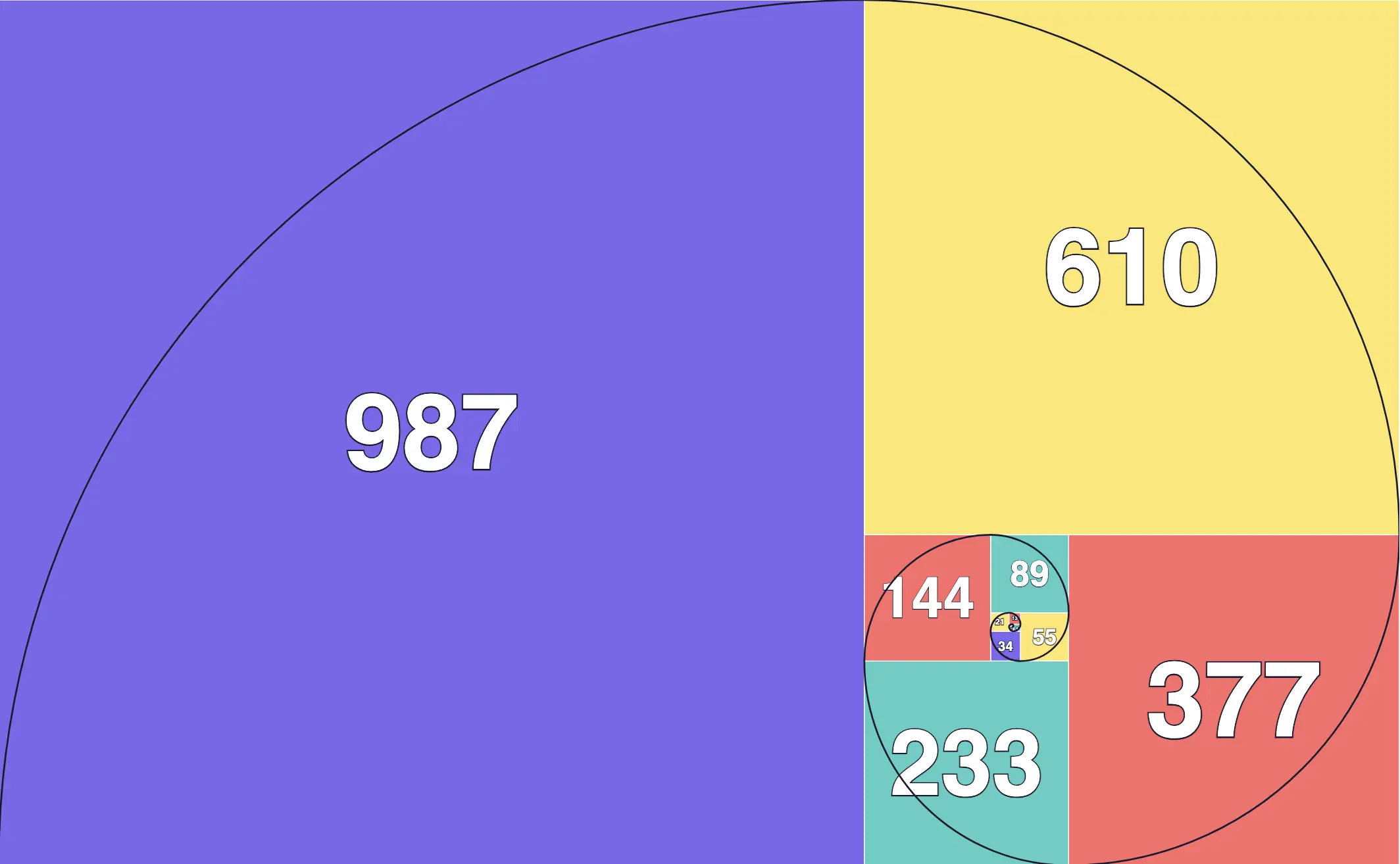
Unconstrained prompts on local models, "Generate a program to render the Fibonacci spiral in ASCII/SVG" are often enough for a constrained model to result in significant reasoning loops and incoherent output. Some explanations pinpoint to excessive instruction density and attention mechanism drift as potential culprits. Local agents are also very expensive time-wise, although they have unlimited tokens. While, theoretically, an agent with unlimited resources may eventually stumble upon a solution through brute force, we introduce Iterative Scaffolding as a cost savings methodology.
Iterative Scaffolding
Step 1: Calculating the bounds of the Fibonacci Squares
In the first iteration, we chose to represent the Fibonacci Square in ASCII. Even this simple instruction required a two-stage prompt. First, we prompted the model to create a program (Appendix A.1) to constrain the bounds.
% python3 fibonacci_box.py 4
.....
.....
.....
% python3 fibonacci_box.py 3
..
..
..
% python3 fibonacci_box.py 2
..
% python3 fibonacci_box.py 1
.
Step 2: An ASCII Fibonacci Square
Constructing the square by hand for small values of N, we observe a simple pattern for its construction. The spiral of squares is repeated through (cardinal) directional changes: East, North, West, and South. A simple recursive relationship can be determined for the placement of squares, labeling the squares of subsequent iterations with letters of the alphabet starting with N=2. We leave the first position as a dot, and then fill the second cell with an A, the third set of cells with B, etc. By replacing the difference between the output of N, N-1, N-2, ..., 1 with the next letter of the alphabet, we create an alphabetic Fibonacci Square.
| Iteration | Fibonacci Matrix |
|---|---|
| N = 1 | . |
| N = 2 | .A |
| N = 3 | BB,BB,.A |
| N = 4 | CCCBB,CCCBB,CCC.A |
| N = 5 | CCCBB,CCCBB,CCC.A,DDDDD,DDDDD,DDDDD,DDDDD,DDDDD |
Using these as multi-shot examples in the next prompt, and proposing this as a puzzle for the LLM to solve, after an hour of reasoning and failing, the agent arrived at a solution (Appendix A.2), that generalizes to any value of N.
% python3 alpha_spiral.py 6
CCCBBEEEEEEEE
CCCBBEEEEEEEE
CCC.AEEEEEEEE
DDDDDEEEEEEEE
DDDDDEEEEEEEE
DDDDDEEEEEEEE
DDDDDEEEEEEEE
DDDDDEEEEEEEE
Step 3: SVG-generated Fibonacci Squares
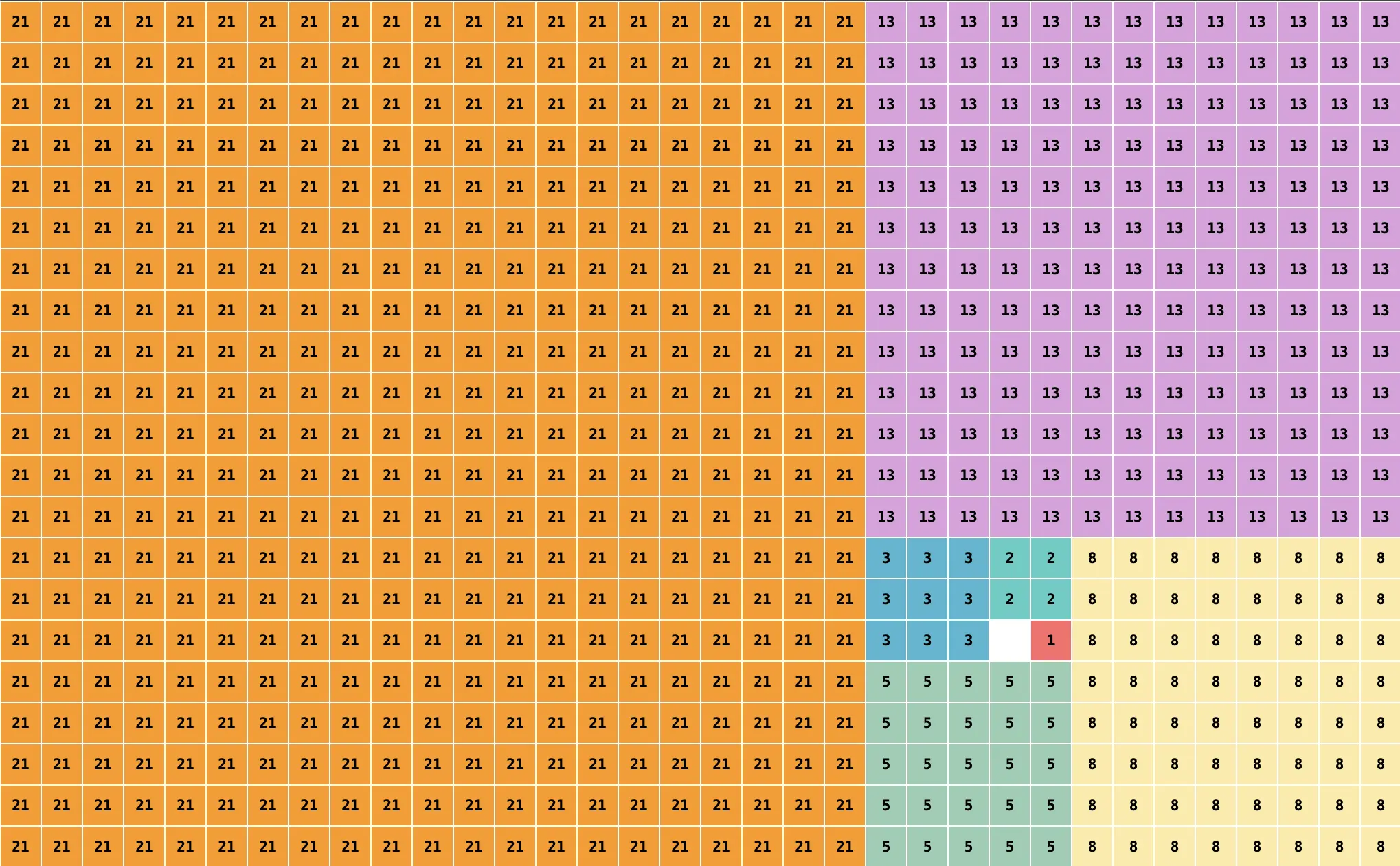
Continuing with the iterative chain-of-prompts technique, we instruct the model to base the SVG rendering off the algorithms developed in alpha_spiral.py. We arbitrarily chose Typescript for this stage, and the model originally had the Typescript program calling alpha_spiral.py directly.
const result = await $`python3 alpha_spiral.py ${n}`.text();
However, in the final version (Appendix B.1), we instructed the model to port these Python functions to Typescript. This version worked up to values of N = 13, but file size grew exponentially due to each individual cell in the grid generating a <rect>. SVGs between N = 14 and N = 17 generated successfully, although they appeared too large to render. Greater than N = 17, produced an Out of memory error (OOM) in createSVG.
192 |   const svg = createSVG(grid, cellSize);
                    ^
RangeError: Out of memory
| N | SVG size | # of <rect> |
|---|---|---|
| 6 | 28K | 104 |
| 8 | 172K | 714 |
| 10 | 1.2M | ~5k |
| 13 | 20M | ~88k |
| 14 | 54M | ~230k |
| 17 | 923M | ~4.1M |
| 18 | OOM | OOM |
We would have the LLM address the memory issue after we had formation of the Fibonacci Spiral. However, generation of the spiral turned out to be difficult for the LLM to solve in one-shot. Although, the model came very close.
Step 4: Almost an SVG-generated Fibonacci Spiral (LLM)
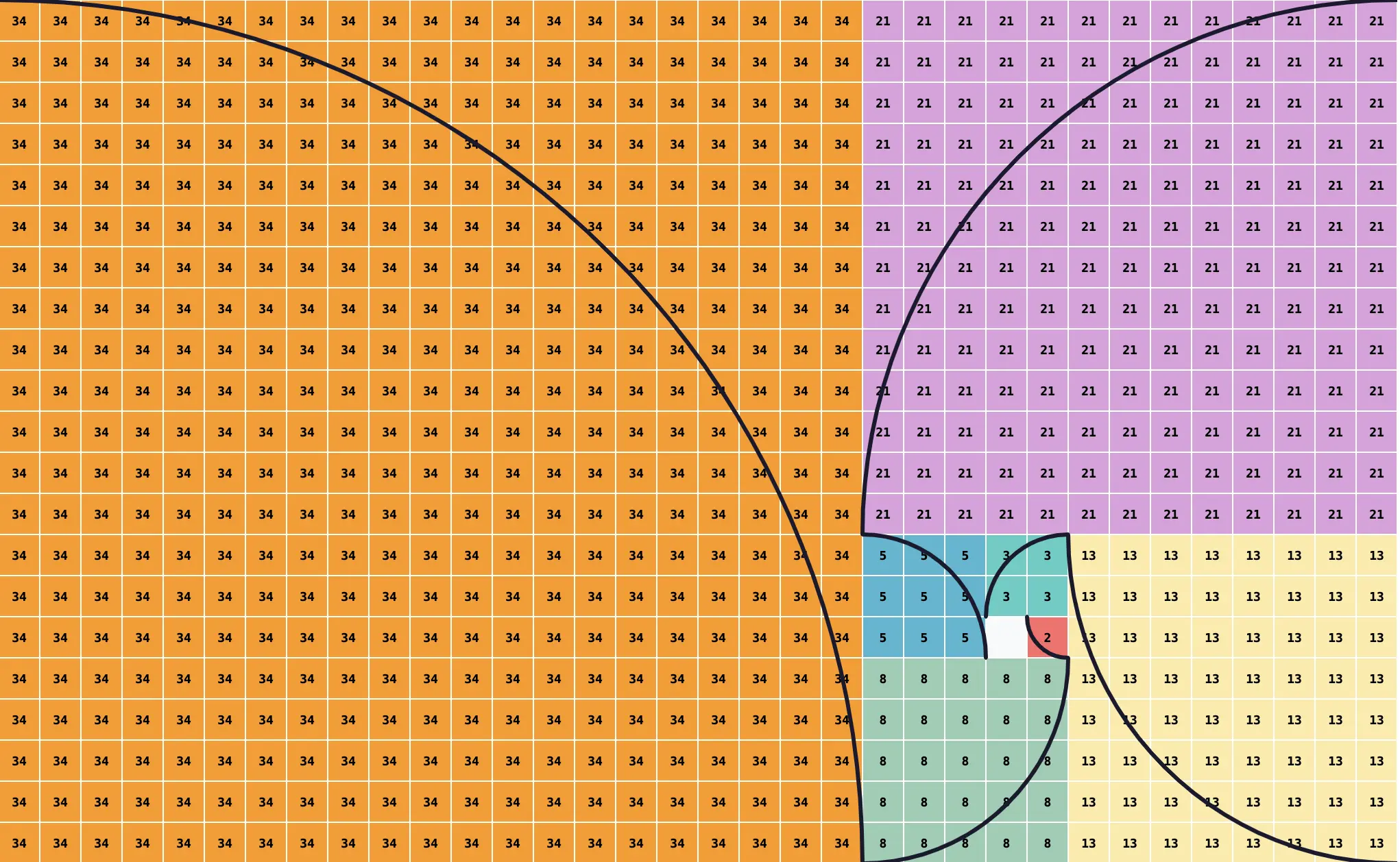
The original Fibonacci spiral generated by the LLM suffered from a phase-shift bug. This was such a minor issue that this was hand-corrected, along with the off-by-one error seen in the screenshot above. (This was the only manual correction made to any of the LLM-generated output during this entire study.)
< const ARC: Array<{sweep: 0|1, fromCorner: string, toCorner: string}> = [
<   { sweep: 0, fromCorner: 'NW', toCorner: 'SE' },
<   { sweep: 1, fromCorner: 'SW', toCorner: 'NE' },
<   { sweep: 0, fromCorner: 'SE', toCorner: 'NW' },
<   { sweep: 1, fromCorner: 'NE', toCorner: 'SW' },
< ];
> const ARC: Array<{sweep: 0|1, fromCorner: string, toCorner: string}> = [
>   { sweep: 0, fromCorner: 'SW', toCorner: 'NE' },
>   { sweep: 0, fromCorner: 'SE', toCorner: 'NW' },
>   { sweep: 0, fromCorner: 'NE', toCorner: 'SW' },
>   { sweep: 0, fromCorner: 'NW', toCorner: 'SE' },
> ];
The LLM struggled with the empty cell representing the first 1 term in the Fibonacci sequence, which had been a . in alpha_spiral.py. This propagation led to the off-by-one error in the ARC Array (and cell labels). Future experimentation should consider prompts that eliminate this propagation, which should not prove intractable.
Step 4: An improved SVG-generated Fibonacci Spiral
Once we fixed the ARC Array, we prompted the model to bring the labeling in line with the Wikipedia PNG file.
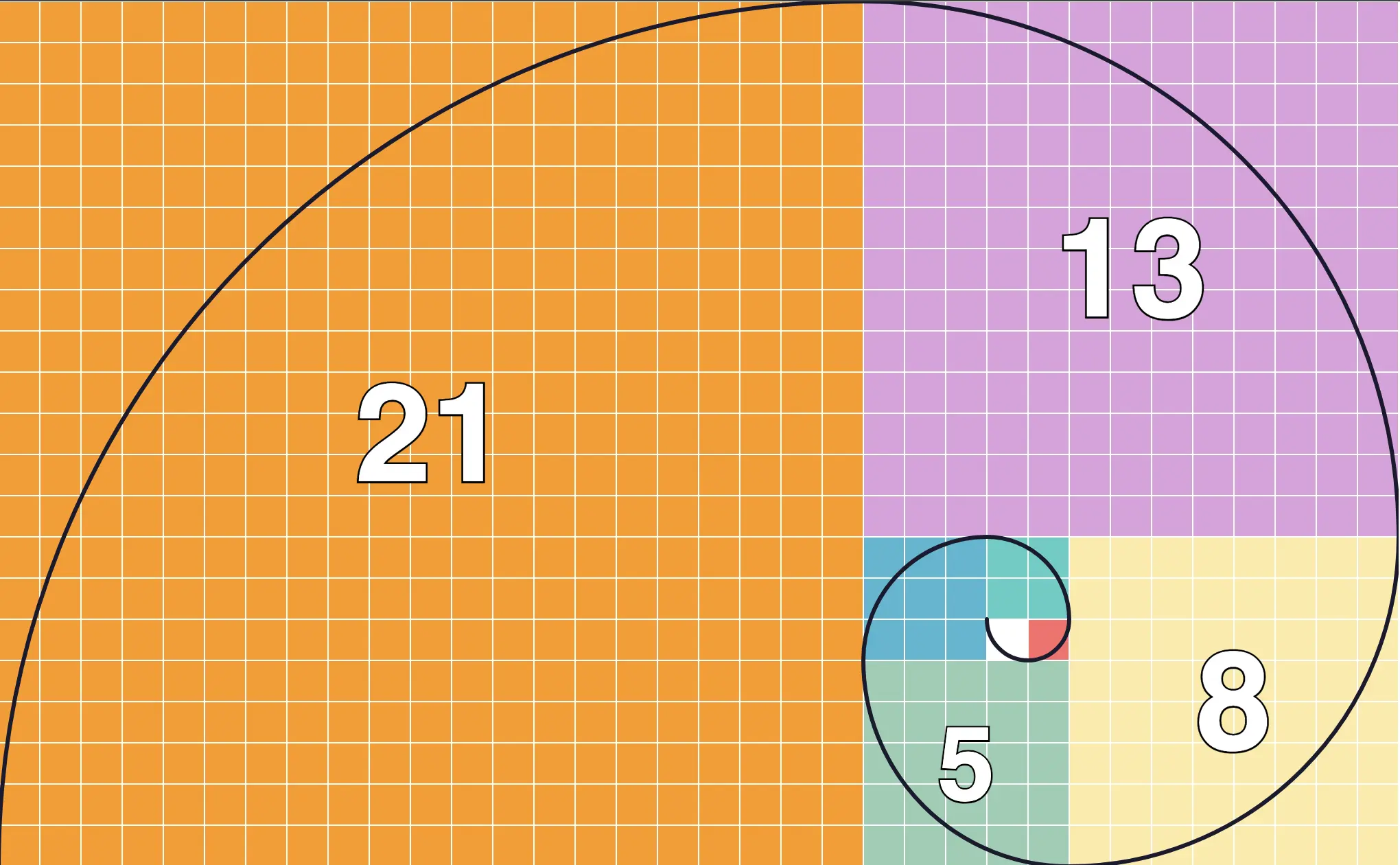
At higher levels of N, the rendering of the individual cells became less important, and this was still the biggest contributor to the SVG size.
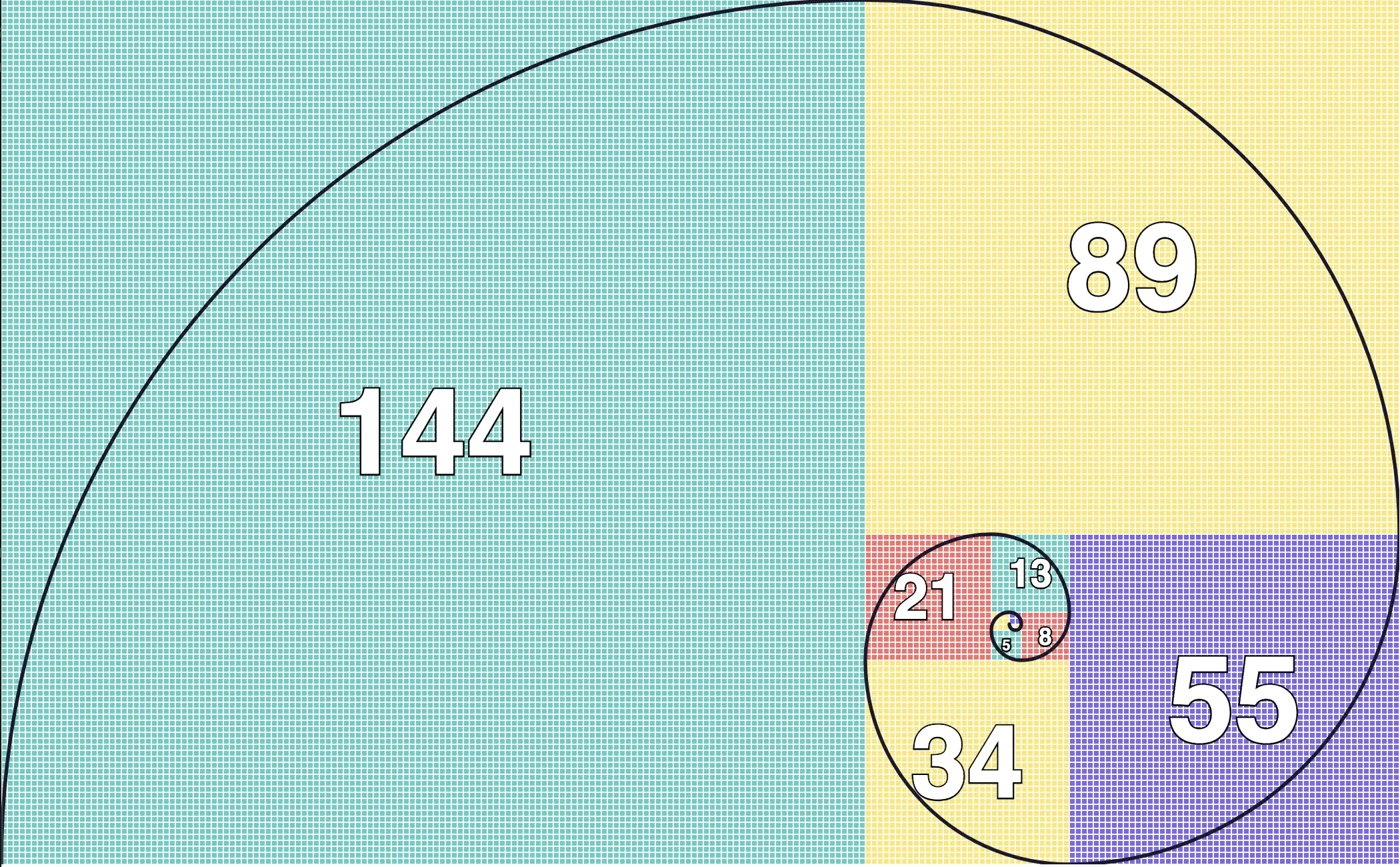
Step 5: An optimized SVG-generated Fibonacci Spiral
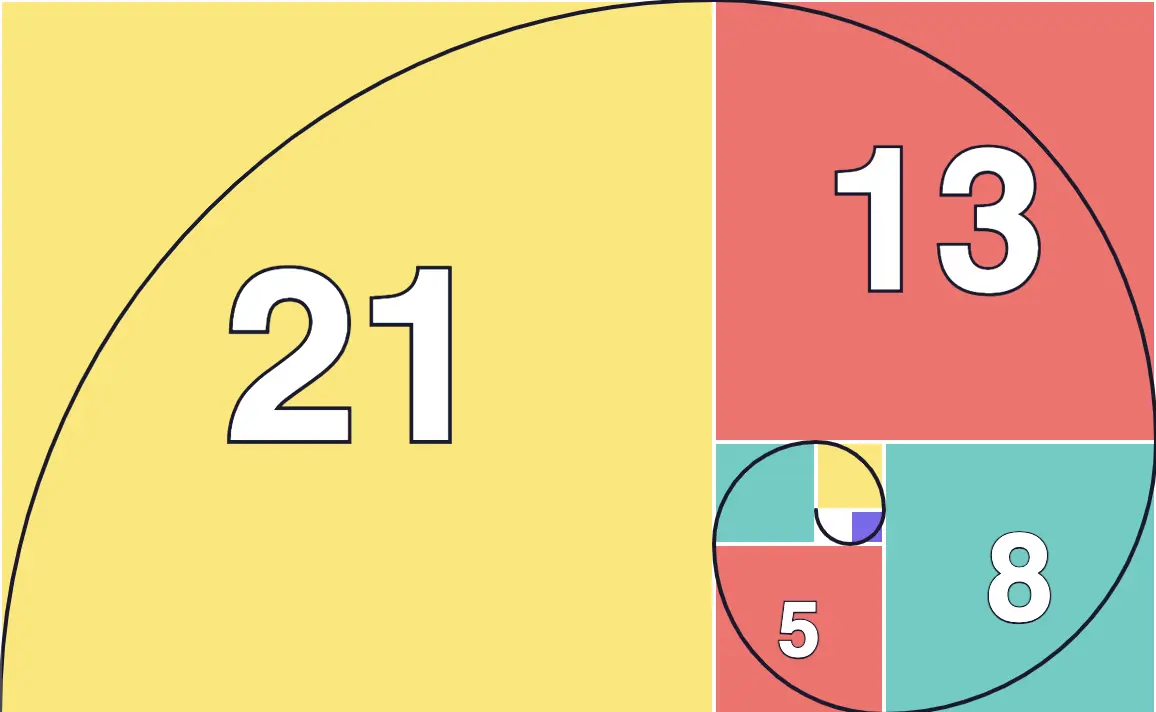
The final optimized version at N = 8 (Appendix C1.) without individual cells rendered comes in at 80% the size of the Wikipedia SVG advertised on the page as 11k. The N = 20 version of the optimized SVG comes in slightly under 40% of the Wikipedia version, although it is unknown what the size of this would be at N = 20.
Results and Limitations
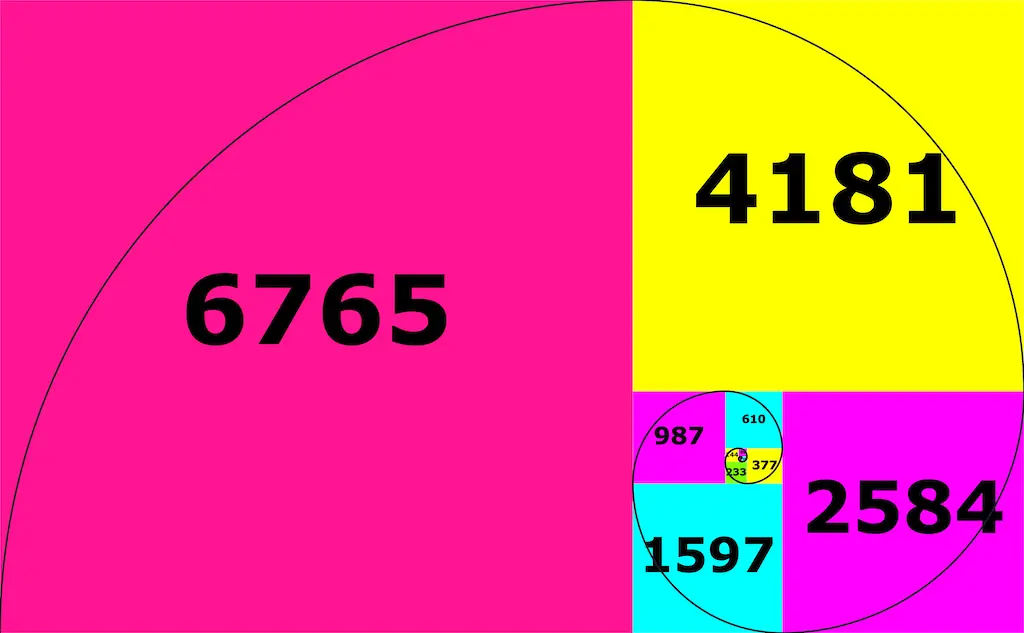
Even though the file size itself has dropped substantially from the removal of individual cells, the sheer dimensions of the resulting SVG at higher resolutions makes even viewing the Fibonacci Squares difficult. Additionally, as the LLM identifies (Appendix D1.), further changes in the data structure and advancements in the algorithm will be necessary to extend the Fibonacci Squares beyond current limits.
Appendix A: ASCII Fibonacci Square - Python Source Code Listings
A.1 ASCII Fibonacci Box (fibonacci_box.py)
#!/usr/bin/env python3
import sys

def fibonacci(n):
    """Calculate the nth Fibonacci number"""
    if n <= 0:
        return 0
    elif n == 1:
        return 1
    else:
        a, b = 0, 1
        for _ in range(2, n + 1):
            a, b = b, a + b
        return b

def draw_box(width, height):
    for y in range(height):
        for x in range(width):
            print(".", end="")
        print()

if __name__ == "__main__":
    if len(sys.argv) != 2:
        print(f"Usage: {sys.argv[0]} <n>")
        sys.exit(1)

    try:
        n = int(sys.argv[1])
    except ValueError:
        print("Error: Argument must be an integer")
        sys.exit(1)

    x = fibonacci(n)
    y = fibonacci(n + 1)

    # If N is even, flip X and Y
    if n % 2 == 0:
        x, y = y, x

    draw_box(x, y)
A.2 ASCII Fibonacci Squares (alpha_spiral.py)
#!/usr/bin/env python3
"""
rebox - Recursively builds boxes based on fibonacci_box.py N output

Each level N adds new cells that get filled with the next letter.
Directions cycle: EAST (N=2), NORTH (N=3), WEST (N=4), SOUTH (N=5), repeat
"""
import sys

def fibonacci(n):
    if n <= 0: return 0
    if n == 1: return 1
    a, b = 0, 1
    for _ in range(2, n + 1):
        a, b = b, a + b
    return b

def get_dims(n):
    """Get width and height as fibonacci_box.py N"""
    w, h = fibonacci(n), fibonacci(n + 1)
    if n % 2 == 0:
        w, h = h, w
    return w, h

def get_prev_placement(n):
    """Determine where to place N-1 result in current grid"""
    cur_w, cur_h = get_dims(n)
    prev_w, prev_h = get_dims(n - 1)

    if n % 4 == 2:        # EAST: N=2,6,10,... - prev at LEFT
        return (0, 0)
    elif n % 4 == 3:      # NORTH: N=3,7,11,... - prev at BOTTOM
        return (cur_h - prev_h, 0)
    elif n % 4 == 0:      # WEST: N=4,8,12,... - prev at RIGHT
        return (0, cur_w - prev_w)
    else:                 # SOUTH: N=5,9,13,... - prev at TOP
        return (0, 0)

def solve(n):
    if n == 1:
        return ['.']

    cur_w, cur_h = get_dims(n)
    prev_result = solve(n - 1)
    prev_w, prev_h = get_dims(n - 1)
    row_off, col_off = get_prev_placement(n)

    letter = chr(ord('A') + n - 2)

    # All dots initially
    result = [['.' for _ in range(cur_w)] for _ in range(cur_h)]

    # Place N-1 result
    for r in range(prev_h):
        for c in range(prev_w):
            rr, cc = r + row_off, c + col_off
            if rr < cur_h and cc < cur_w:
                result[rr][cc] = prev_result[r][c]

    # Fill only new cells (not from N-1)
    for r in range(cur_h):
        for c in range(cur_w):
            in_prev = (row_off <= r < row_off + prev_h and
                      col_off <= c < col_off + prev_w)
            if not in_prev:
                result[r][c] = letter

    return result

def main():
    if len(sys.argv) < 2:
        print(f"Usage: {sys.argv[0]} <N>")
        sys.exit(1)
    n = int(sys.argv[1])
    for row in solve(n):
        print(''.join(row))

if __name__ == '__main__':
    main()
Appendix B: SVG Fibonacci Squares and Spirals - Typescript Source Code Listings
B.1 ASCII Fibonacci Squares (draw_standalone.py)
#!/usr/bin/env bun

/**
 * draw_standalone.ts — Standalone Fibonacci squares spiral SVG generator.
 *
 * Port of alpha_spiral.py functions to TypeScript + SVG drawing logic.
 *
 * Usage: bun draw_standalone.ts [N]     (default N=8)
 */

// ─── Python → TypeScript port of alpha_spiral.py ─────────────────────────

function fibonacci(n: number): number {
  if (n <= 0) return 0;
  if (n === 1) return 1;
  let a = 0, b = 1;
  for (let _i = 2; _i <= n; _i++) {
    [a, b] = [b, a + b];
  }
  return b;
}

interface Dims { w: number; h: number }

function getDims(n: number): Dims {
  let w = fibonacci(n);
  let h = fibonacci(n + 1);
  if (n % 2 === 0) {
    [w, h] = [h, w];
  }
  return { w, h };
}

function getDimsW(n: number): number { return getDims(n).w; }
function getDimsH(n: number): number { return getDims(n).h; }

function getPrevPlacement(n: number): [number, number] {
  // cur_w, cur_h = getDims(n)
  // prev_w, prev_h = getDims(n-1)
  const [curW, curH] = [getDimsW(n), getDimsH(n)];
  const [prevW, prevH] = [getDimsW(n - 1), getDimsH(n - 1)];

  if (n % 4 === 2) {
    // EAST: N=2,6,10,... — prev at LEFT
    return [0, 0];
  } else if (n % 4 === 3) {
    // NORTH: N=3,7,11,... — prev at BOTTOM
    return [curH - prevH, 0];
  } else if (n % 4 === 0) {
    // WEST: N=4,8,12,... — prev at RIGHT
    return [0, curW - prevW];
  } else {
    // SOUTH: N=5,9,13,... — prev at TOP
    return [0, 0];
  }
}

type Grid = string[][];

function solve(n: number, cell: string = 'x'): Grid {
  if (n === 1) {
    return [['.']];
  }

  const curW = getDimsW(n);
  const curH = getDimsH(n);
  const prevResult = solve(n - 1, cell);
  const prevW = getDimsW(n - 1);
  const prevH = getDimsH(n - 1);
  const [rowOff, colOff] = getPrevPlacement(n);

  const letter = String.fromCharCode('A'.charCodeAt(0) + n - 2);

  // All dots initially
  const result: Grid = Array.from({ length: curH }, () =>
    Array.from({ length: curW }, () => '.')
  );

  // Place N-1 result
  for (let r = 0; r < prevH; r++) {
    for (let c = 0; c < prevW; c++) {
      const rr = r + rowOff;
      const cc = c + colOff;
      if (rr < curH && cc < curW) {
        result[rr][cc] = prevResult[r][c];
      }
    }
  }

  // Fill new cells
  for (let r = 0; r < curH; r++) {
    for (let c = 0; c < curW; c++) {
      const inPrev =
        rowOff <= r && r < rowOff + prevH &&
        colOff <= c && c < colOff + prevW;
      if (!inPrev) {
        result[r][c] = letter;
      }
    }
  }

  return result;
}

// ─── SVG drawing ──────────────────────────────────────────────────────────

const SVG_NS = "http://www.w3.org/2000/svg";

const PALETTE: Record<string, string> = {
  A: "#FF6B6B", B: "#4ECDC4", C: "#45B7D1", D: "#96CEB4",
  E: "#FFEAA7", F: "#DDA0DD", G: "#FF9800", H: "#82E0AA",
  I: "#AED6F1", J: "#F9E79F", K: "#D2B4DE", L: "#F5B7B1",
  M: "#85C1E9",
};

function getColor(letter: string): string {
  return PALETTE[letter] ?? "#8888AA";
}

function createSVG(grid: string[][], cellSize: number): string {
  const height = grid.length;
  const width = grid[0].length;
  const svgW = width * cellSize;
  const svgH = height * cellSize;
  const parts: string[] = [];

  for (let row = 0; row < height; row++) {
    for (let col = 0; col < width; col++) {
      const letter = grid[row][col];
      if (letter === ".") continue;

      const fib = letterToDigit(letter);
      const color = getColor(letter);
      const x = col * cellSize;
      const y = row * cellSize;

      parts.push(
        `<rect x="${x}" y="${y}" width="${cellSize}" height="${cellSize}" fill="${color}" stroke="white" stroke-width="1"/>`
      );

      const fontSize = cellSize * 0.35;
      parts.push(
        `<text x="${x + cellSize / 2}" y="${y + cellSize / 2}" fill="black" font-size="${fontSize}" fontFamily="monospace" fontWeight="bold" text-anchor="middle" dominant-baseline="central">${fib}</text>`
      );
    }
  }

  return [
    `<svg xmlns="${SVG_NS}" width="${svgW}" height="${svgH}" viewBox="0 0 ${svgW} ${svgH}">`,
    `<rect width="${svgW}" height="${svgH}" fill="white"/>`,
    ...parts,
    `</svg>`,
  ].join("\n");
}

function letterToDigit(letter: string): number {
  const i = letter.charCodeAt(0) - "A".charCodeAt(0);
  return fibonacci(i + 2);
}

// ─── Main ─────────────────────────────────────────────────────────────────

async function main() {
  const nArg = process.argv[2]
    ? parseInt(process.argv[2], 10)
    : 8;

  if (isNaN(nArg) || nArg < 1) {
    console.error("Usage: bun draw_standalone.ts [N]");
    process.exit(1);
  }

  // ── Step 1: Build the spiral grid using the ported Python functions ──
  console.log(`Building spiral (N=${nArg}) via solve(${nArg})...`);
  const grid = solve(nArg);

  // ── Step 2: Print the grid (identical to alpha_spiral.py output) ──
  console.log("\nGrid (alpha_spiral.py output):");
  for (const row of grid) {
    console.log(row.join(""));
  }

  // ── Step 3: Generate SVG ──
  const cellSize = Math.min(
    Math.floor(1200 / grid[0].length),
    Math.floor(800 / grid.length),
    30,
  );

  console.log(`\nCell size: ${cellSize}px → SVG ${grid[0].length * cellSize}×${grid.length * cellSize}`);

  const svg = createSVG(grid, cellSize);
  await Bun.write("fibonacci_spiral_standalone.svg", svg);
  console.log("Wrote fibonacci_spiral_standalone.svg");

  // ── Step 4: Show mapping ──
  const letters = [...new Set(grid.flat())].filter((c) => c !== ".").sort();
  console.log("\nMapping:");
  for (const letter of letters) {
    const digit = letterToDigit(letter);
    const count = grid.flat().filter((c) => c === letter).length;
    const area = cellSize * cellSize;
    console.log(
      `  ${letter} → fib(${letter.charCodeAt(0) - 64 + 2})=${digit}  |  area=${count} cells = ${(count * area).toLocaleString()} px²`,
    );
  }

  // ── Step 5: Verify against fibonacci_box dims ──
  const dims = getDims(nArg);
  console.log(`\nGrid size: ${grid[0].length}×${grid.length}  |  expected: ${dims.w}×${dims.h}`);
  const match = grid[0].length === dims.w && grid.length === dims.h;
  console.log(`✅ Grid dims match getDims(${nArg}) ${match ? "—" : "❌ MISMATCH!"}`);
}

main().catch((err) => { console.error(err); process.exit(1); });
Appendix C: Optimized Fibonacci Spiral - SVG Source Code Listings
C1. SVG for Fibonacci Spiral (N=8)
<svg xmlns="http://www.w3.org/2000/svg" width="578" height="357" viewBox="0 0 578 357">
<rect width="578" height="357" fill="#f8f9fa"/>
<g><rect x="425" y="255" width="17" height="17" fill="#7B68EE" stroke="white" stroke-width="2" stroke-linejoin="round"/></g>
<g><rect x="408" y="221" width="34" height="34" fill="#FFE66D" stroke="white" stroke-width="2" stroke-linejoin="round"/>
<rect x="0" y="0" width="357" height="357" fill="#FFE66D" stroke="white" stroke-width="2" stroke-linejoin="round"/></g>
<g><rect x="357" y="221" width="51" height="51" fill="#4ECDC4" stroke="white" stroke-width="2" stroke-linejoin="round"/>
<rect x="442" y="221" width="136" height="136" fill="#4ECDC4" stroke="white" stroke-width="2" stroke-linejoin="round"/></g>
<g><rect x="357" y="272" width="85" height="85" fill="#FF6B6B" stroke="white" stroke-width="2" stroke-linejoin="round"/>
<rect x="357" y="0" width="221" height="221" fill="#FF6B6B" stroke="white" stroke-width="2" stroke-linejoin="round"/></g>
<text x="399.5" y="314.5" fill="white" stroke="#1a1a2e" stroke-width="2" font-size="38.25" font-family="sans-serif" font-weight="bold" paint-order="stroke" text-anchor="middle" dominant-baseline="central">5</text>
<text x="510" y="289" fill="white" stroke="#1a1a2e" stroke-width="2.04" font-size="61.2" font-family="sans-serif" font-weight="bold" paint-order="stroke" text-anchor="middle" dominant-baseline="central">8</text>
<text x="467.5" y="110.5" fill="white" stroke="#1a1a2e" stroke-width="3.315" font-size="99.45" font-family="sans-serif" font-weight="bold" paint-order="stroke" text-anchor="middle" dominant-baseline="central">13</text>
<text x="178.5" y="178.5" fill="white" stroke="#1a1a2e" stroke-width="4" font-size="120" font-family="sans-serif" font-weight="bold" paint-order="stroke" text-anchor="middle" dominant-baseline="central">21</text>
<path d="M 425 272 A 17 17 0 0 0 442 255 M 442 255 A 34 34 0 0 0 408 221 M 408 221 A 51 51 0 0 0 357 272 M 357 272 A 85 85 0 0 0 442 357 M 442 357 A 136 136 0 0 0 578 221 M 578 221 A 221 221 0 0 0 357 0 M 357 0 A 357 357 0 0 0 0 357" fill="none" stroke="#1a1a2e" stroke-width="2" stroke-linecap="round" stroke-linejoin="round"/>
</svg>
Appendix D: LLM insights
Disclaimer: This appendix was generated by the LLM.
D1. Remaining Bottleneck
For N≥22, the grid computation itself (solve() + adjacencyGrid()) dominates. The adjacency graph scan over 507M cells is unavoidable without a different data structure.
For Beyond N≈20 (Future Work)
Replace the full grid with direct block position computation:
- Each block is a square of size fib(i), positioned via the spiral's 4-phase cycle
- Compute block bounds directly: O(N) instead of O(fib(N)²)
- Compute adjacency from the known geometric pattern (O(N) instead of O(fib(N)²))
This would let you go to N=50+ with SVG sizes still <10KB (still N blocks × 200B each).